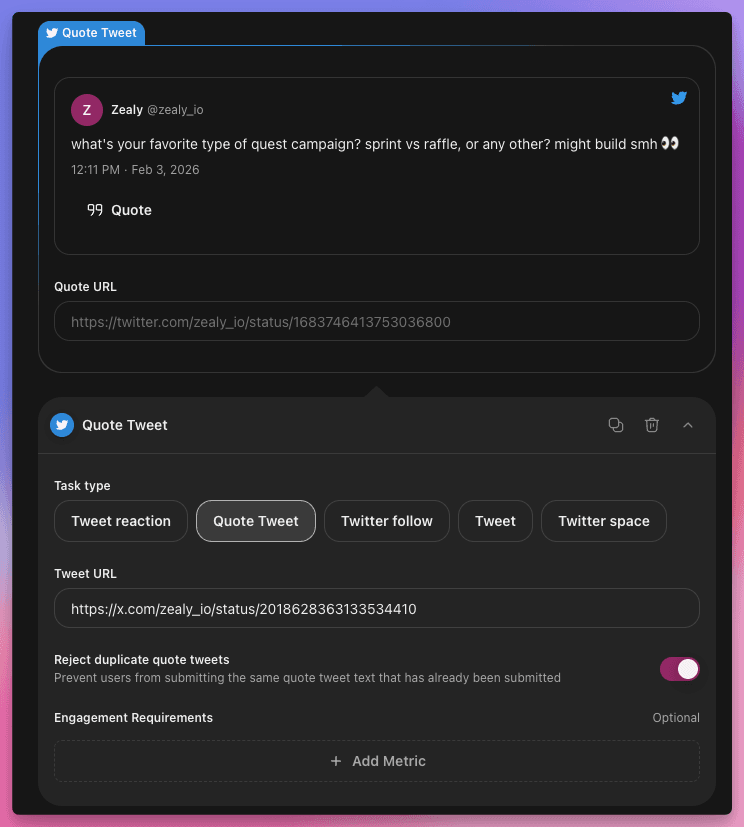
Tweet Quote Task
Introducing Tweet Quote Task—a new Twitter task type that verifies users quote tweet a specific post. Unlike simple retweets, quote tweets let users add their own commentary, creating more authentic and engaging social proof for your campaigns.
Why Quote Tweets?
- Personalized amplification: Users share your content with their own take, reaching their audience in a more organic way
- Higher engagement: Quote tweets naturally generate more discussion than plain retweets
- Original content: With the duplicate rejection setting, every submission is guaranteed to be unique
- AI Review compatible: Use AI Review to evaluate the quality of quote text at scale
How It Works
Setting up a quote tweet task is straightforward:
- Click on 'Add task' and pick 'Twitter'
- Choose 'Quote Tweet'
- Paste the link to the tweet you want users to quote
- Optionally, enable 'Reject duplicate submissions' to ensure unique quote text
- Optionally, add engagement requirements (minimum likes, impressions, replies, or retweets)
- Publish your quest
Users will see the target tweet in the task card with a convenient "Quote" button that opens Twitter/X with the compose dialog pre-filled. After posting their quote tweet, they submit the URL for automatic verification.
Key Features
- Automatic verification: Validates that the submitted tweet actually quotes the correct target tweet
- Duplicate detection: Optionally reject quote tweets that copy text from existing submissions
- Engagement metrics: Set minimum thresholds for likes, impressions, replies, or retweets on the user's quote
- AI Review support: Let AI evaluate the quality and relevance of quote text
Ready to drive authentic engagement? Add a Quote Tweet task to your next quest and let your community amplify your content in their own voice.